Still Dialing From a Spreadsheet? The Hidden Cost of Manual Lead Lists
A shared spreadsheet is an easy place to start outbound calling. It is familiar, quick to set up, and already available to most small teams. But as more people call from the same list, it gets harder to tell who owns each lead, which follow-up is due, and what happened on the last call. The…
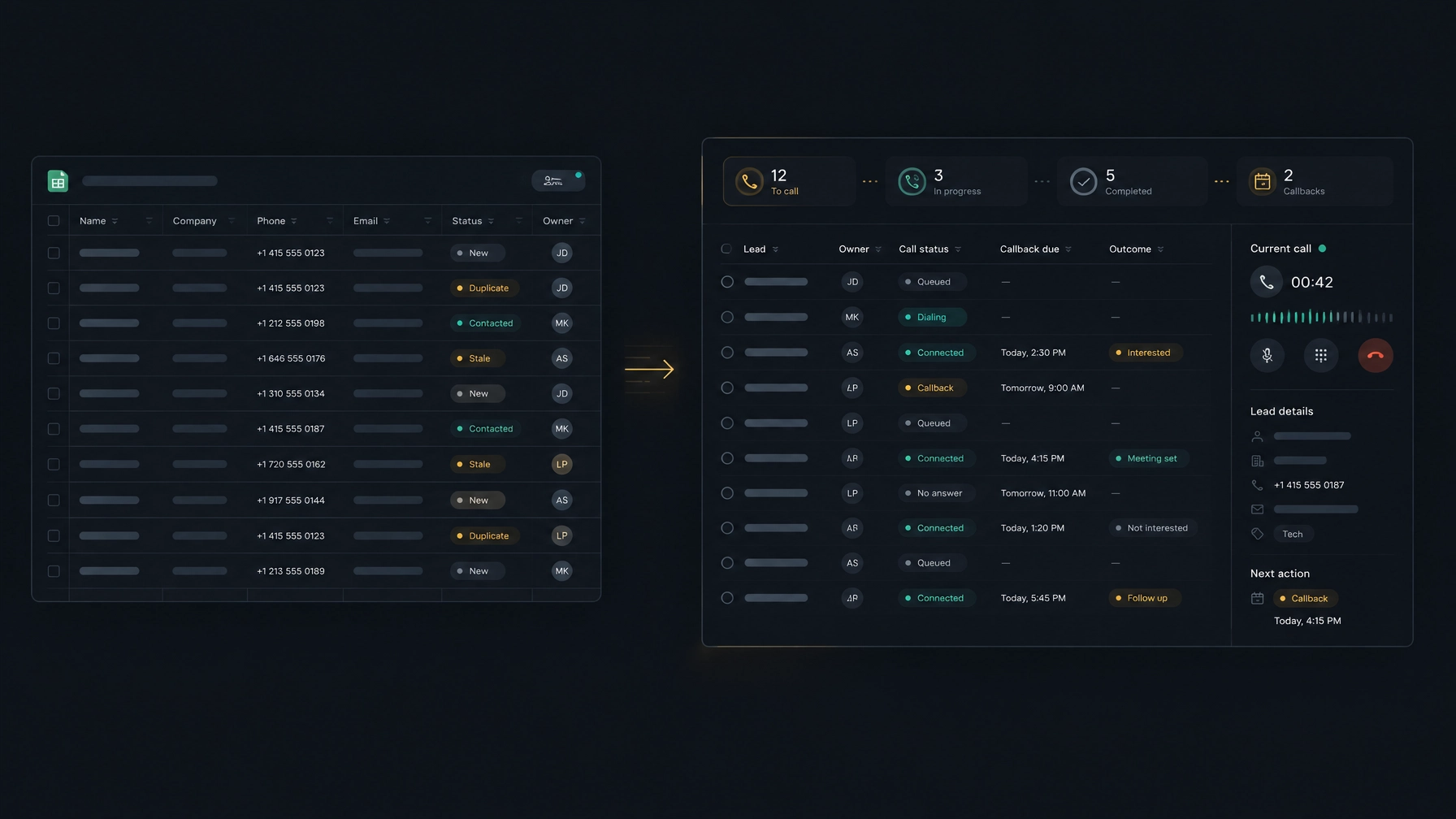
A shared spreadsheet is an easy place to start outbound calling. It is familiar, quick to set up, and already available to most small teams. But as more people call from the same list, it gets harder to tell who owns each lead, which follow-up is due, and what happened on the last call.
The sheet itself is not the problem. The problem is asking it to coordinate a live sales workflow. When reps work from separate copies, update statuses late, or keep call notes somewhere else, leads can get missed and managers lose a clear view of activity.
A thoughtful spreadsheet to dialer migration gives your team one place to work through a lead list, record call outcomes, and set next steps. Here’s how to spot when the spreadsheet is costing you time, what a dialer can change, and how to move without disrupting your calling.
Where manual lead lists break down
A spreadsheet stores information. It does not reliably coordinate who acts on that information, or when. That gap can create four recurring problems.
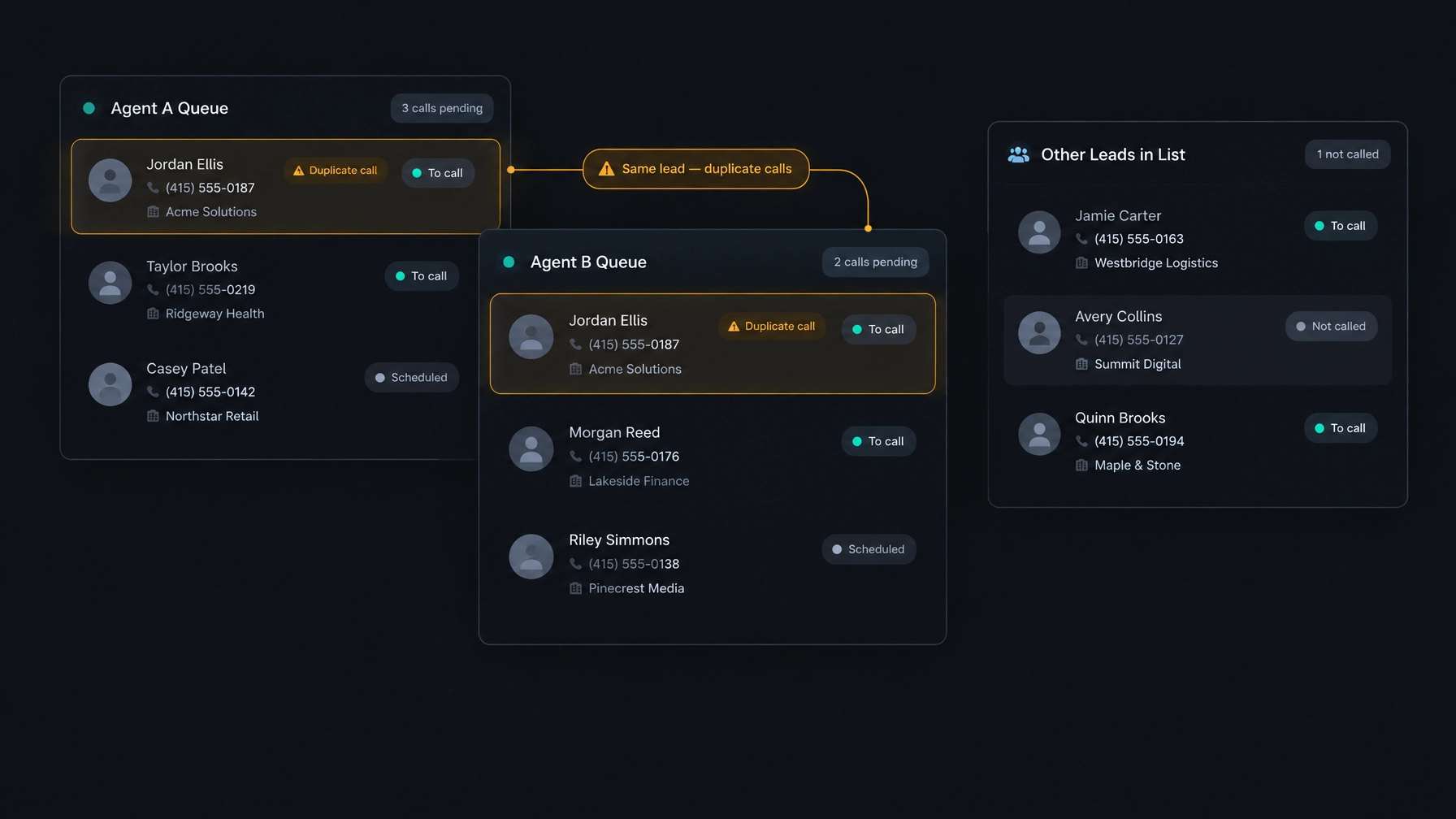
Two reps call the same person
Imagine a small team with two reps sharing a list of local businesses. One rep downloads a copy in the morning. The other edits the live sheet after lunch. If both copies show the same lead as “New,” they may both call that person without realizing it.
Color-coding rows or adding initials can help, but only if every rep checks and updates the same file at the right time. A delayed edit, a filtered view, or a separate copy can undo the system.
Follow-ups depend on memory
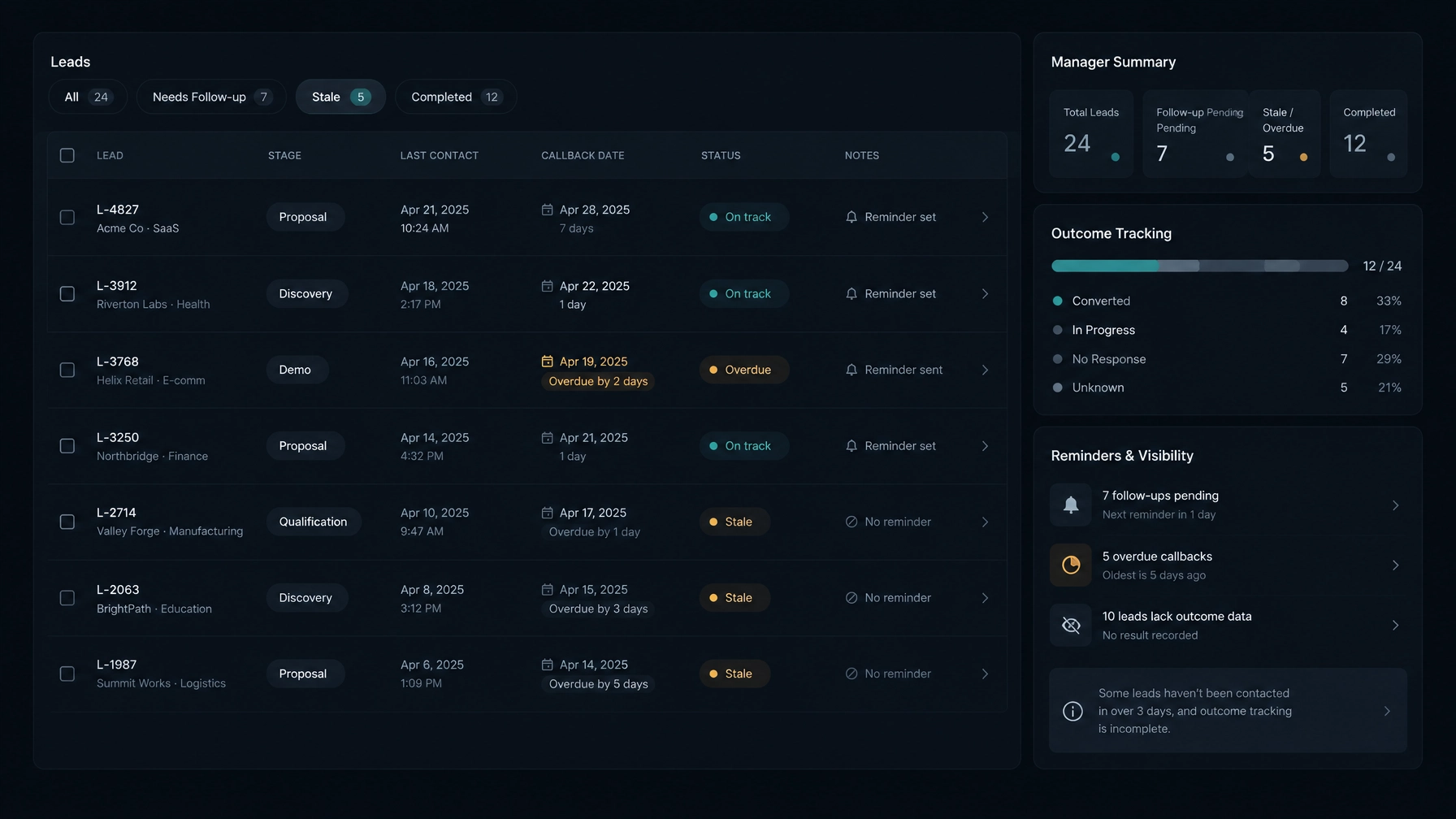
A note like “try again Friday” is useful only if someone sees it on Friday. In a spreadsheet, a rep may need to remember the note, find the right row, and filter the list before starting calls. If the note is buried, the follow-up slips.
This can happen after an unanswered call, a request to send more information, or a prospect asking to reconnect after a specific event. The lead remains in the file, but the next action is easy to overlook.
Call outcomes are missing or hard to compare
When reps record calls at the end of the day, they may forget details or enter different versions of the same outcome. One person writes “callback,” another writes “follow up,” and another leaves the cell blank.
The manager then has to interpret inconsistent notes. It becomes harder to tell which leads need another attempt, which are not interested, and which have progressed.
Managers cannot see the work clearly
A manager might ask, “Which leads still need a first call?” or “How many prospects asked us to follow up?” With a shared sheet, answering can mean checking filters, reviewing notes, and asking reps to confirm what they did.
That takes time and can still leave gaps. The spreadsheet may show the latest edit, not the latest conversation.
What those problems cost a small team
The cost is not just extra admin. It is time spent reconciling records instead of speaking with prospects, and potential opportunities lost when no one follows up.
Consider a small business with two reps and a few hundred prospects from a recent event. One rep calls a contact and leaves a voicemail but forgets to update the shared sheet. The second rep calls the same contact the next day. Meanwhile, another prospect who asked for a callback is still marked “Contacted,” with no date attached.
Each issue looks minor on its own. Together, they create avoidable work:
- Reps spend time checking who called and when.
- Prospects may receive repeated or poorly timed outreach.
- Follow-ups rely on someone remembering to filter the list.
- Managers cannot confidently review activity or assign next steps.
- Call outcomes are less useful for planning the next campaign.
A spreadsheet may still be the right choice for one person with a small list and a manageable follow-up load. The case for a change gets stronger when multiple reps share leads, callbacks often get missed, or a manager needs a dependable picture of the team’s work.
What changes when the list lives in a dialer
A dialer with contact management brings the calling task and the lead record closer together. Instead of treating the list as a document that reps update later, the team works from records tied to call activity and next steps.
Work from one shared source of truth
A shared system gives reps and managers the same current lead records. When the platform supports record ownership or a shared queue, the team can see who is responsible for each lead before calling.
This can reduce duplicate outreach, but a dialer does not prevent every duplicate call by default. Check how the product handles duplicate records, ownership, and repeat attempts. Agree on a simple rule for assigning and suppressing leads before the team starts dialing.
Record outcomes while the call is fresh
A call workflow can prompt the rep to choose an outcome and add a note immediately after the call. That makes the record more useful for the next person who opens it.
Use a short, consistent set of outcomes, such as:
- Connected, follow-up needed
- No answer
- Not interested
- Wrong number
- Do not call
Choose the options that fit your campaign, and make sure reps know when to use each one. Avoid a long list of labels that mean nearly the same thing.
Give every follow-up a next step
A follow-up needs more than a note. It needs an owner and a date. If your dialer supports callback scheduling or reminders, use those features to bring due work back into the rep’s workflow.
For example, after a prospect asks for a call next Tuesday, the rep should save the date with the outcome rather than rely on memory or a free-text note alone. Managers can then review upcoming work and see which leads have no next action.
Review a clearer activity history
When call outcomes, notes, and callbacks stay with the contact, the next conversation can start with context. A manager can also review what happened without rebuilding the story from several tabs or files.
The exact capabilities vary by platform. Some systems connect call dispositions to lead statuses automatically. Others require the rep to update a status separately. Confirm what updates automatically and what your team must do during wrap-up.
A practical path from spreadsheet to dialer
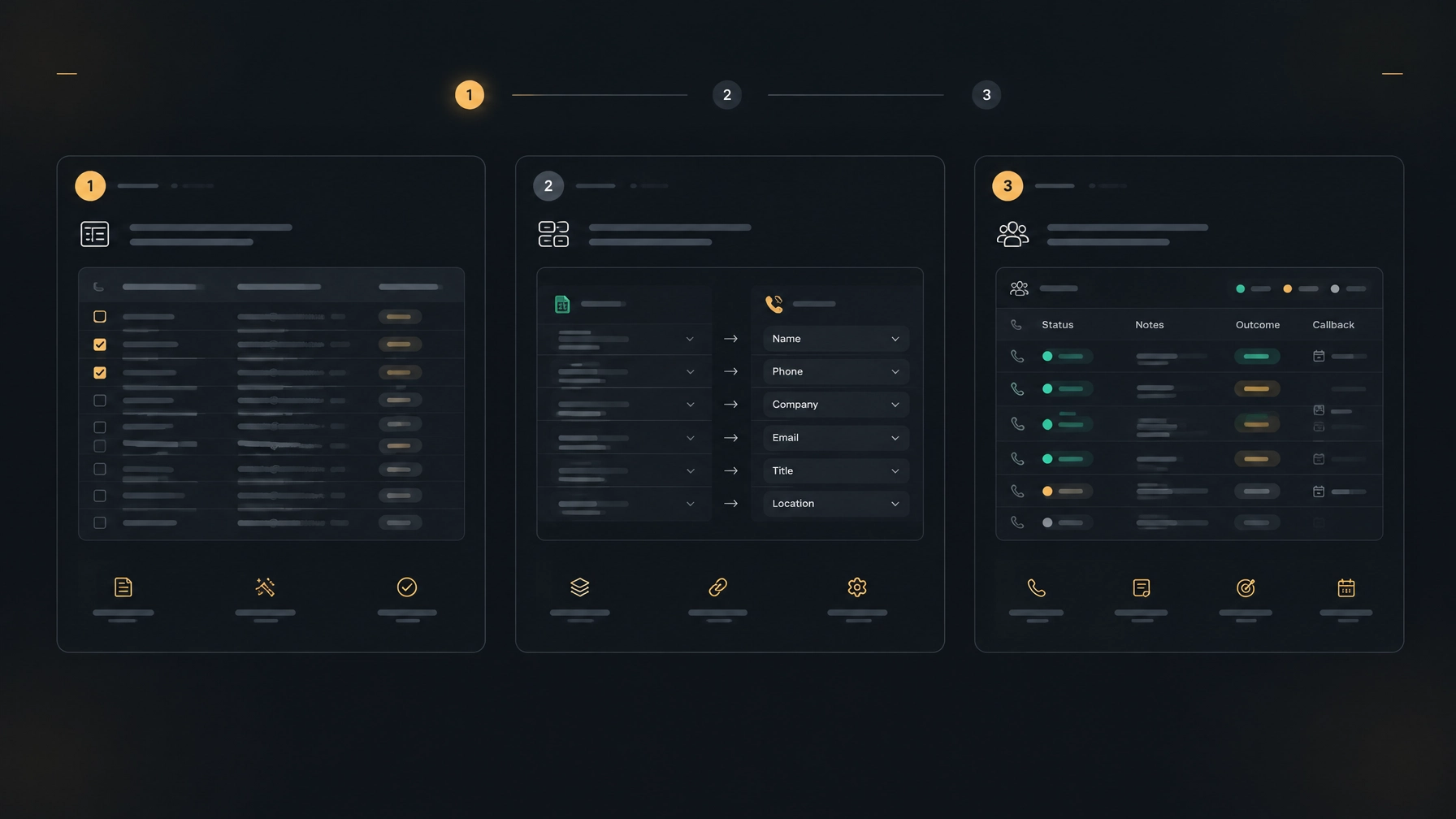
A successful migration is more than uploading a file. First decide how your team will use the new workflow. Then check the data, test a small group of records, and train reps on the steps they need to repeat.
1. Decide what the team needs to track
Review the current spreadsheet and keep fields that help a rep make or prepare for a call. Common fields include name, company, phone number, lead source, owner, current status, last contact date, notes, and next action.
Remove columns that are outdated or unused. Replace color-only coding with written values that can be understood without a legend.
2. Clean the list before moving it
Look for duplicate rows, missing phone numbers, inconsistent status labels, and records that should no longer be contacted. Confirm that your team has a clear process for do-not-call requests and suppression lists.
Keep the original sheet as a read-only archive once you begin the transition. Avoid maintaining two editable lead lists indefinitely; that recreates the split between systems.
3. Set ownership and outcome rules
Decide who assigns new leads, how reps record call results, and what counts as a complete follow-up. For example, every connected call could require an outcome, a brief note, and either a next action or a clear reason no further action is needed.
Keep these rules short enough for reps to use during a busy calling session.
4. Test a small batch first
Move a sample of records and check that names, phone numbers, notes, and statuses appear as expected. Have reps test the full workflow: open a lead, make or log a call, save an outcome, and set the next step.
Use what you learn to adjust field mapping and team instructions before moving the rest of the list.
5. Choose a cutover date and review the process
Tell the team when new work moves to the dialer and when the spreadsheet becomes an archive. After the change, review a few records together. Check that outcomes are being saved, callbacks have dates, and reps know where to find lead history.
Measure practical indicators that matter to your team, such as duplicate contacts, missed callbacks, records without an outcome, and time spent preparing daily call lists. Use the review to fix workflow gaps, not to add reporting for its own sake.
See how NexusDialer handles lead lists
NexusDialer’s website describes CSV contact and list imports, contact and deal records, pipeline stages, call history, outcomes, notes, and callbacks. Its calling setup also includes progressive and predictive dialing. Calling opens after workspace approval and telephony setup, so confirm the requirements for your team before planning a rollout.
You can explore NexusDialer to review the current features. For more on evaluating calling workflows and existing phone infrastructure, see How to Reduce Contact Center Costs Without Switching SIP Providers.
If you are considering a move, ask the NexusDialer team whether a list-import walkthrough is appropriate for your setup. The site also provides a way to discuss your setup.
Frequently asked questions
When should a small team move from a spreadsheet to a dialer?
Consider moving when multiple reps work the same leads, follow-ups are regularly late, call outcomes are inconsistent, or managers cannot see the activity they need. A solo seller with a small, well-maintained list may be fine with a spreadsheet.
Will a dialer automatically prevent duplicate calls?
Not always. Duplicate prevention depends on how the platform handles record matching, ownership, shared queues, and repeat attempts. Ask the provider what controls are available, then set clear lead-assignment rules for your team.
Can a dialer track callbacks and call outcomes?
Many dialers let reps record call results and schedule callbacks, but the workflow varies by product. Confirm whether reps can save these details on the lead record and whether reminders or queues surface due follow-ups.
What should I clean before importing a lead list?
Remove duplicates, normalize phone numbers, clarify status labels, and review outdated or restricted records. Keep only fields the team needs, and retain a read-only copy of the original sheet for reference.
Does NexusDialer support CSV lead imports?
The NexusDialer website describes CSV contact and list imports. Review the current feature details on nexusdialer.com and confirm any setup requirements with the team before migrating your records.